

Hello Everyone,
In this blog, we will learn about how to Create Custom Payment Methods in Magento 2.
Payment Method is one of the most important in any E-Commerce Site.
You can gain customers’ trust by selecting the perfect payment solution.
Without wasting your time, let us guide you straight away. Follow the easy step given below to Create Custom Payment Method in Magento 2.
STEPS FOR CREATE CUSTOM PAYMENT METHOD IN MAGENTO 2
Step 1: Create module.xml file
app/code/Vendor/Extension/etc/module.xml
<?xml version="1.0"?>

<config xmlns:xsi="http://www.w3.org/2001/XMLSchema-instance" xsi:noNamespaceSchemaLocation="urn:magento:framework:Module/etc/module.xsd">

    <module name="Vendor_Extension" setup_version="1.0.0">

    <sequence>

            <module name="Magento_Sales"/>

            <module name="Magento_Payment"/>

            <module name="Magento_Checkout"/>

        </sequence>

    </module>

</config>
We Just add dependencies of other module under <sequence> tag.
Step 2: Create registration.php file
app/code/Vendor/Extension/registration.php
<?php

\Magento\Framework\Component\ComponentRegistrar::register(

    \Magento\Framework\Component\ComponentRegistrar::MODULE,

    'Vendor_Extension',

    __DIR__

);
Step 3: Create system.xml file
app/code/Vendor/Extension/etc/adminhtml/system.xml
<?xml version="1.0"?>

<config xmlns:xsi="http://www.w3.org/2001/XMLSchema-instance" xsi:noNamespaceSchemaLocation="urn:magento:module:Magento_Config:etc/system_file.xsd">

    <system>

    <section id="payment">

        <group id="testpayment" translate="label" sortOrder="1" showInDefault="1" showInWebsite="1" showInStore="1">

        <label>Magecurious - Custom Payment Method</label>

            <field id="active" translate="label comment" sortOrder="1" type="select" showInDefault="1" showInWebsite="1" showInStore="1">

            <label>Enable</label>

            <source_model>Magento\Config\Model\Config\Source\Yesno</source_model>

            </field>

            <field id="order_status" translate="label" type="select" sortOrder="1" showInDefault="1" showInWebsite="1" showInStore="1">

            <label>New Order Status</label>

            <source_model>Magento\Sales\Model\Config\Source\Order\Status\NewStatus</source_model>

            </field>

            <field id="title" translate="label" type="text" sortOrder="1" showInDefault="1" showInWebsite="1" showInStore="1">

            <label>Title</label>

            </field>

             <field id="allowspecific" translate="label" type="allowspecific" sortOrder="1" showInDefault="1" showInWebsite="1" showInStore="1">

            <label>Payment from Applicable Countries</label>

            <source_model>Magento\Payment\Model\Config\Source\Allspecificcountries</source_model>

            </field>

            <field id="specificcountry" translate="label" type="multiselect" sortOrder="1" showInDefault="1" showInWebsite="1" showInStore="1">

            <label>Payment from Specific Countries</label><source_model>Magento\Directory\Model\Config\Source\Country</source_model>

            <can_be_empty>1</can_be_empty>

            </field>

            <field id="model"></field>

            <field id="sort_order" translate="label" type="text" sortOrder="1" showInDefault="1" showInWebsite="1" showInStore="1">

            <label>Sort Order</label>

            <frontend_class>validate-number</frontend_class>

            </field>

        </group>

    </section>

    </system>

</config>
Step 4: Create config.xml file
app/code/Vendor/Extension/etc/config.xml
<?xml version="1.0"?>

<config xmlns:xsi="http://www.w3.org/2001/XMLSchema-instance" xsi:noNamespaceSchemaLocation="../../Store/etc/config.xsd">

    <default>

        <payment>

            <testpayment>

                <payment_action>authorize</payment_action>

                <model>Vendor\Extension\Model\PaymentMethod</model>

                <active>1</active>

                <title>Custom Payment Method</title>

                <order_status>pending_payment</order_status>

            </testpayment>

        </payment>

    </default>

</config>
Step 5: Create Payment Method.php file
app/code/Vendor/Extension/Model/PaymentMethod.php
<?php

namespace Vendor\Extension\Model;

/**

 * Pay In Store payment method model

 */

class PaymentMethod extends \Magento\Payment\Model\Method\AbstractMethod

{

    /**

     * Payment code

     *

     * @var string

     */

    protected $_code = 'testpayment';

    /**

     * Authorizes specified amount.

     *

     * @param InfoInterface $payment

     * @param float         $amount

     *

     * @return $this

     *

     * @throws LocalizedException

     */

    public function authorize(\Magento\Payment\Model\InfoInterface $payment, $amount)

    {

        return $this;

    }

}
Step 6: Create checkout_index_index.xml file
app/code/Vendor/Extension/view/frontend/layout/checkout_index_index.xml
<?xml version="1.0"?>

<page xmlns:xsi="http://www.w3.org/2001/XMLSchema-instance" xsi:noNamespaceSchemaLocation="urn:magento:framework:View/Layout/etc/page_configuration.xsd">

    <body>

        <referenceBlock name="checkout.root">

            <arguments>

                <argument name="jsLayout" xsi:type="array">

                    <item name="components" xsi:type="array">

                        <item name="checkout" xsi:type="array">

                            <item name="children" xsi:type="array">

                                <item name="steps" xsi:type="array">

                                    <item name="children" xsi:type="array">

                                        <item name="billing-step" xsi:type="array">

                                            <item name="component" xsi:type="string">uiComponent</item>

                                            <item name="children" xsi:type="array">

                                                <item name="payment" xsi:type="array">

                                                    <item name="children" xsi:type="array">

                                                        <item name="renders" xsi:type="array">

                                                            <!-- merge payment method renders here -->

                                                            <item name="children" xsi:type="array">

                                                                <item name="testpayment" xsi:type="array">

                                                                    <item name="component" xsi:type="string">Vendor_Extension/js/view/payment/method-renderer</item>

                                                                    <item name="methods" xsi:type="array">

                                                                        <item name="testpayment" xsi:type="array">

                                                                            <item name="isBillingAddressRequired" xsi:type="boolean">true</item>

                                                                        </item>

                                                                    </item>

                                                                </item>

                                                            </item>

                                                        </item>

                                                    </item>

                                                </item>

                                            </item>

                                        </item>

                                    </item>

                                </item>

                            </item>

                        </item>

                    </item>

                </argument>

            </arguments>

        </referenceBlock>

    </body>

</page>
Step 7: Create method-renderer.js file
app/code/Vendor/Extension/view/frontend/web/js/view/payment/method-renderer.js
define(

    [

        'uiComponent',

        'Magento_Checkout/js/model/payment/renderer-list'

    ],

    function (

        Component,

        rendererList

    ) {

        'use strict';

        rendererList.push(

            {

                type: 'testpayment',

                component: 'Vendor_Extension/js/view/payment/method-renderer/testpayment'

            }

        );

        return Component.extend({});

    }

);
Step 8: Create testpayment.js file
app/code/Vendor/Extension/view/frontend/web/js/view/payment/method-renderer/testpayment.js
/*browser:true*/

/*global define*/

define(

    [

        'ko',

        'jquery',

        'Magento_Checkout/js/view/payment/default',

    ],

    function (ko, $, Component, setPaymentMethodAction) {

        'use strict';

        return Component.extend(

            {

                defaults: {

                                template: 'Vendor_Extension/payment/testpayment'

                },

                afterPlaceOrder: function () {

                    setPaymentMethodAction(this.messageContainer);

                    return false;

                },

                /**

                 * Returns send check to info

                 */

                getMailingAddress: function () {

                    return window.checkoutConfig.payment.customtemplate.mailingAddress;

                }

            }

        );

    }

);
Step 9: Create testpayment.html file
app/code/Vendor/Extension/view/frontend/web/template/payment/testpayment.html
<div class="payment-method" data-bind="css: {'_active': (getCode() == isChecked())}">

    <div class="payment-method-title field choice">

        <input type="radio"

               name="payment[method]"

               class="radio"

               data-bind="attr: {'id': getCode()}, value: getCode(), checked: isChecked, click: selectPaymentMethod, visible: isRadioButtonVisible()"/>

        <label data-bind="attr: {'for': getCode()}" class="label"><span data-bind="text: getTitle()"></span></label>

    </div>

    <div class="payment-method-content">

        <!-- ko foreach: getRegion('messages') -->

    <!-- ko template: getTemplate() --><!-- /ko -->

    <!--/ko-->

    <div class="payment-method-billing-address">

        <!-- ko foreach: $parent.getRegion(getBillingAddressFormName()) -->

        <!-- ko template: getTemplate() --><!-- /ko -->

        <!--/ko-->

        </div>

        <div class="checkout-agreements-block">

        <!-- ko foreach: $parent.getRegion('before-place-order') -->

        <!-- ko template: getTemplate() --><!-- /ko -->

        <!--/ko-->

        </div>

        <div class="actions-toolbar">

            <div class="primary">

                <button class="action primary checkout"

                        type="submit"

                        data-bind="

                        click: placeOrder,

                        attr: {title: $t('Place Order')},

                        css: {disabled: !isPlaceOrderActionAllowed()},

                        enable: (getCode() == isChecked())

                        "

                        disabled>

                    <span data-bind="i18n: 'Place Order'"></span>

                </button>

            </div>

        </div>

    </div>

</div>
Step 10: Finally run the below commands
$ php bin/magento setup:upgrade

$ php bin/magento cache:clean

$ php bin/magento cache:flush
Step 11: Output:
Now open Magento Admin panel and go to stores->Configuration->Sales->Payment Methods
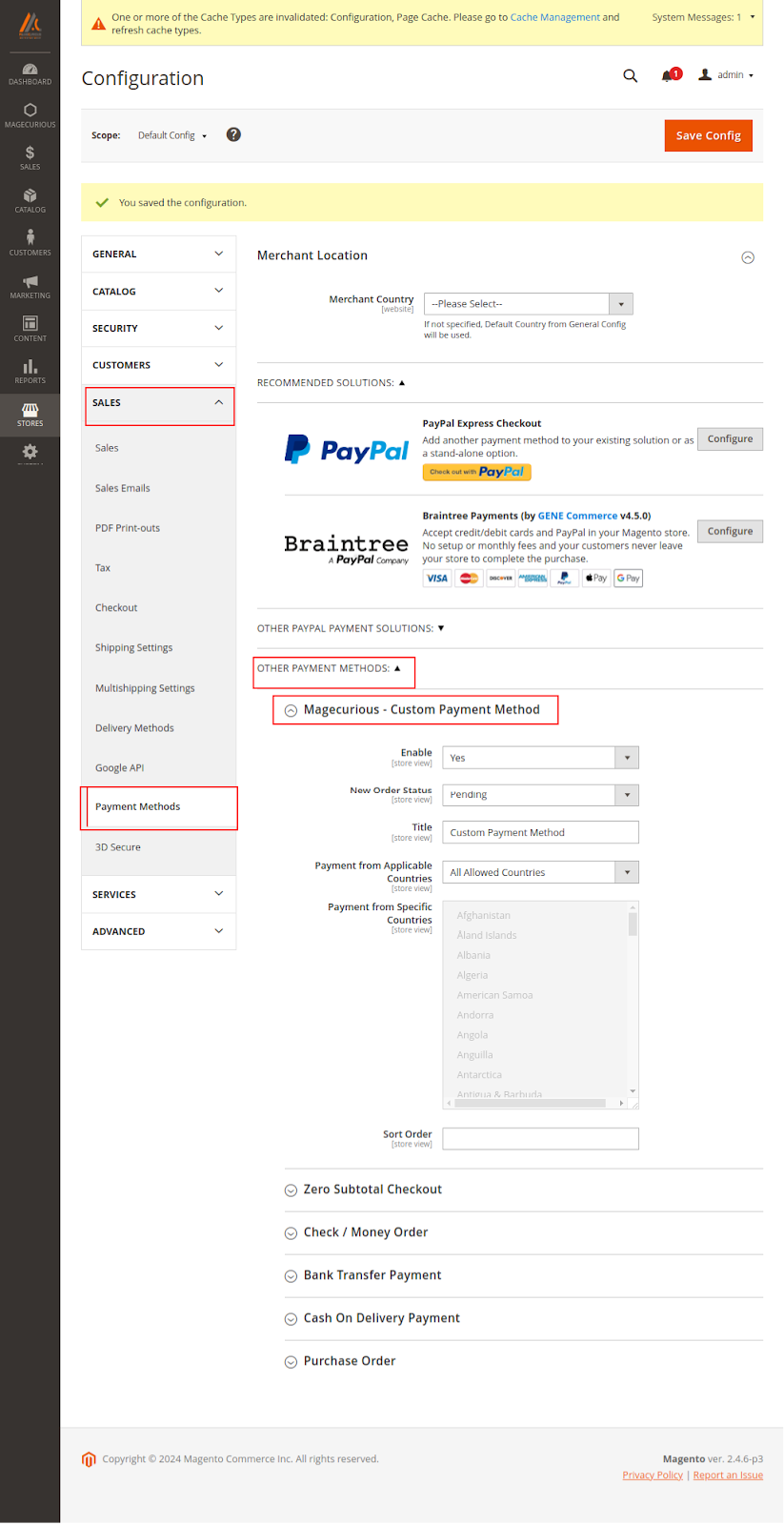
Now go to frontend, add product to cart and go to checkout.

Final Thoughts:
So this was the easiest way which we have told you in this blog. This is how you can Create a Custom Payment Method in Magento 2. Hope you liked the blog.
So quickly go to the comment box and tell me how you like this blog?
Stay tuned with us on our site to get new updates of Magento.
Thanks for reading and visiting our site.
