

Hello Everyone,
In this blog we will learn how to reset admin password in Magento 2?
As we all know how important it is to have a password for security. Similarly, the password is very important to login to the Magento admin panel. But if we forget the password then it becomes a big problem. So now you don’t have to worry. Because Magecurious has brought you the 4 easiest tricks to reset your password to take your worries away.
So if you also want to reset your password… then hurry up, below 4 easy tricks are waiting for you.
MAGENTO 2 ADMIN PASSWORD RESET EASY TRICKS:
1. Reset Admin Password in Magento 2 via Admin Side.
2. Reset Admin Password in Magento 2 via Account Setting.
3. Reset Admin Password in Magento 2 via command Line.
4. Reset Admin Password in Magento 2 via phpmyadmin.
Trick Way 1. Reset Admin Password in Magento 2 via Admin Side.
The easiest way to reset the password is directly from the Admin Side.
- First of all you go to the admin panel.
- Click on the forgot password.

3. Please enter your email address and enter below mention captcha for security. Then click on the Retrieve Password button.

4. After this you will receive an email from Magento side with a link to reset your password. You can easily reset your password by following the link provided.
Trick Way 2. Reset Admin Password in Magento 2 via Account Setting.
The 2nd easiest way is to reset your password from your account settings.
PLEASE NOTE: THIS METHOD WILL COME IN HANDY IF YOU REMEMBER YOUR OLD PASSWORD.
- First you go to the admin panel.
- Then go to Account Setting.
- After that enter the new password.
- Then confirm by re-entering the new password.
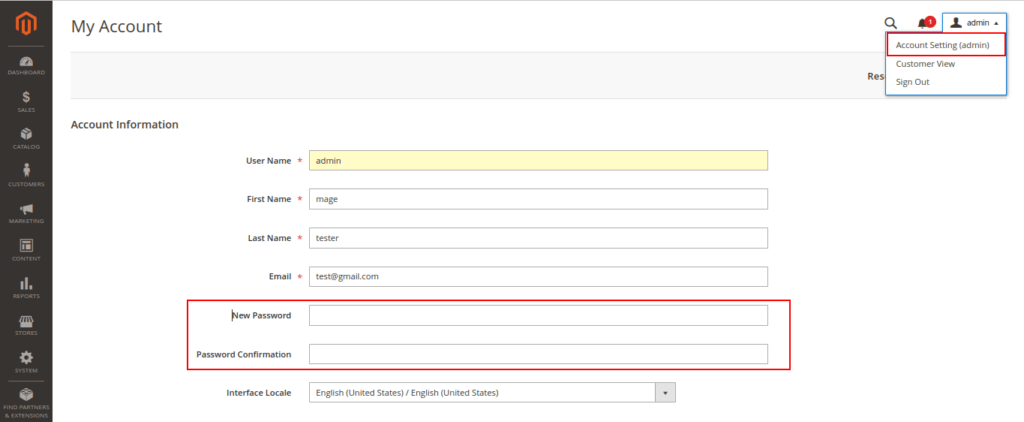
- Enter the old password for identity verification.
- After that click on the save button.
Trick Way 3. Reset Admin Password in Magento 2 via command Line.
The 3rd easiest way is to reset your password via command line.

Command line does not support you to reset password directly.
- You can create a new user from the command line.
- With its help, you can reset the password for the old account.
Trick Way 4. Reset Admin Password in Magento 2 via phpmyadmin.
The 4th easiest way is to reset your password via phpmyadmin.
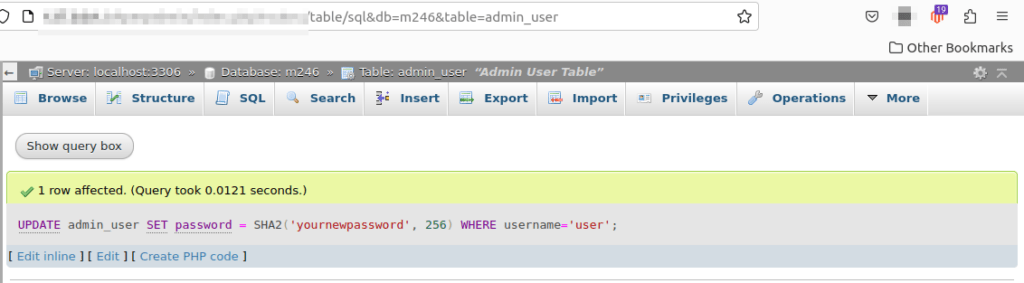
- Go to the phpmyadmin.
- Then click on the database and search for admin_user.
- Run the query as shown in the picture below.
FINAL THOUGHTS:
So this was the easiest way which we have told you in this blog. In this way you can reset your password. Hope you have liked the blog.
So quickly go to the comment box and tell me how you like this blog?
STAY TUNED WITH US ON OUR SITE TO GET NEW UPDATES OF MAGENTO.
Thanks for reading and visiting our site.
