

Hello Magento Experts,
In this blog we will learn how to enable automatic backup in Magento 2?
If the customer does not get the item he wants, he leaves the shop disappointed. Due to this the sales are reduced to a great extent. Magento 2 aims to create the best possible conditions for improving the customer experience at the store. There are a few things that can help with this and navigation is one of them.
Magento 2 provides a catalogue navigation facility to make the on-site experience great for the customers. Layered navigation that appears in the left column of the home page. Using this navigation, the customer can search the products as per his/her requirement on the basis of price, colour, category etc.
So let’s know how to configure navigation.

Steps to configure layered navigation:
- Step 1: First of all login to the admin panel of your Magento Store.
- Step 2: Then click on the store option. After that click on setting. Then choose Configuration.
- Step 3: Go to Configuration and choose Catalog.
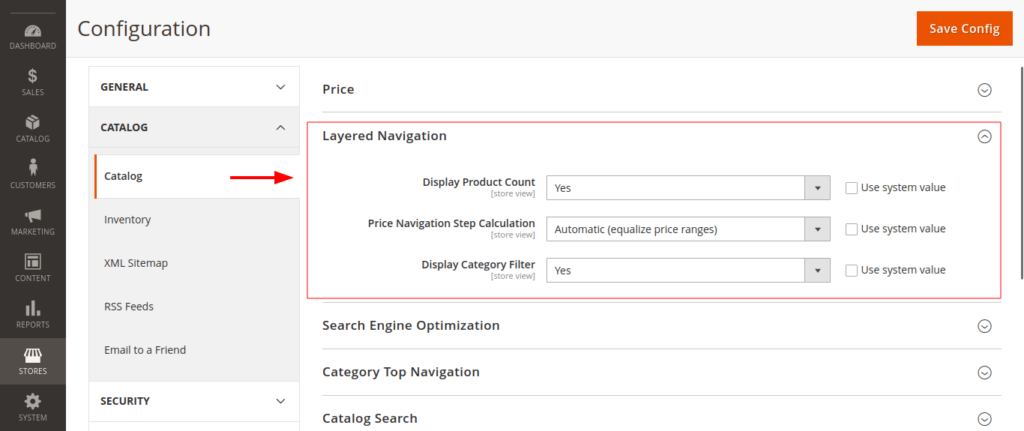
- Display product Count – if you want to see the product count on the display select Yes.
- Price Navigation Step Calculation – Choose any 1 option out of the 3 given below.
- Automatic [equalise price ranges]
Selecting the Auto Equaliser Price Range option automatically calculates the product price as per the quotation.
- Automatic [equalise product counts]
Selecting the Auto Equaliser Product Count option based on the number of products.
- Manual
You can set up the layered navigation as per your choice by choosing manual operation.
- Now click on the save button.
Final Thoughts:
So this was the easiest way which we have told you in this blog. This is how you can configure your layered navigation. Hope you liked the blog.
So quickly go to the comment box and tell me how you like this blog?
Stay tuned with us on our site to get new updates of Magento.
Thanks for reading and visiting our site.
