

Hello Everyone,
In this blog we will learn how to set the locale language & country in Magento 2?
Without wasting your time, let us guide you straight away. Follow the easy step given below to edit your details in magento 2.
STEPS FOR SET LOCALE LANGUAGE & COUNTRY IN MAGENTO 2
STEP 1: THE LOCALE OPTIONS CONFIGURING.
- Click on the Stores > Settings > Configurations.
- Now go to the menu bar on the left side and choose General.
- After that, go to the Locale Option. After that select your Timezone in the given list.
- Now select your store language in the Locale field.
- Then After, Set the measurement unit used the shipments from the locale in the weight unit field.
- Now select your First Day Of Week for working in your share.
- After that, days are considered as Weekend Days in your region.
- Click on save configuration.
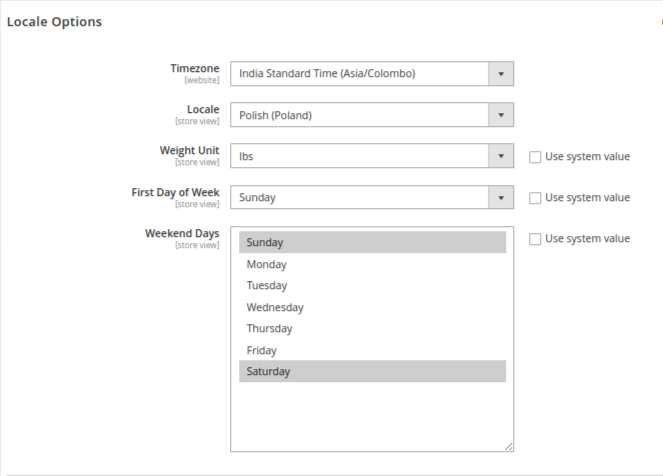
STEP 2: THE STATE OPTIONS CONFIGURING.
- First go to the State Option select in the Admin Panel.
- Under the state option choose State is Required For, After that select the State.
- If this is optional for the country, select the Yes or No options in Allow to select the state.
- Select Yes if entering the state field is optional in the country you specified.
- If the country omits the state option, select no option.
- Click on save configuration.

STEP 3: THE COUNTRY OPTIONS CONFIGURING.
- Go to the Country Options section on the admin panel.
- Under the Default Country, Choose the country where you are.
- Under the Allow Countries, Select the countries you want to accept orders from.
- Under the Zip/Postal code is optional, Choose the country name which the zip codes are optional.
- Under the European Union Countries, select the nations of the European union carry out trading.
- Under the Top Destination, Choose your prime countries of business.
- Click on save configuration.

Final Thoughts:
So this was the easiest way which we have told you in this blog. This is how you can set the locale language & country in Magento 2. Hope you liked the blog.
So quickly go to the comment box and tell me how you like this blog?
Stay tuned with us on our site to get new updates of Magento.
Thanks for reading and visiting our site.
