


Magento 2 City Dropdown


Magento 2 City Dropdown
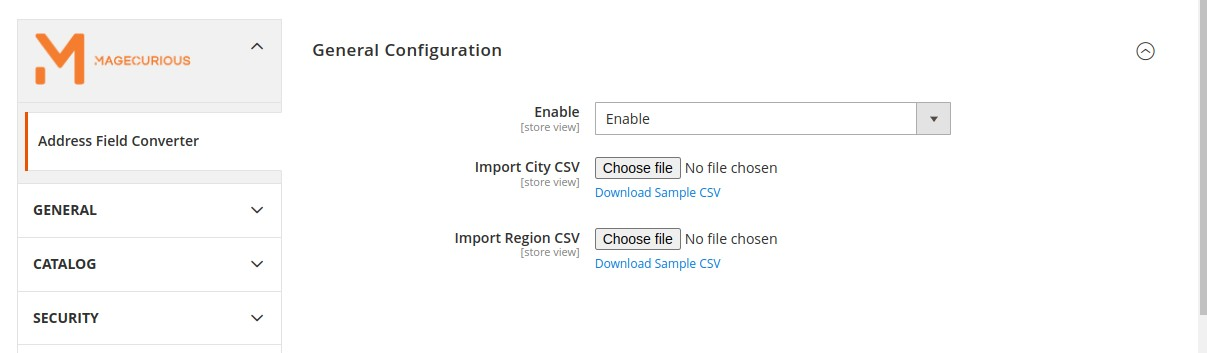
This extension allows the store owners to add additional or edit existing regions/ states and cities to Magento address and also allows the admin to convert the text field attribute to a dropdown attribute in the checkout address [shipping address & billing address] and customer address from my account on the front end.
This extension also allows store owners to convert the text field attribute to a dropdown attribute in the Estimate Shipping and Tax section of the cart page.
Features
- The admin can Enable/Disable the module.
- Import new cities for specific regions.
- Import new regions for specific countries.
- Edit existing & cities.
- Edit Existing Cities.
- Convert text field to Drop-Down field on the cart page, checkout page & customer address from my account
- Compatible With 2.0.x, 2.1.x, 2.2.x, 2.3.x, 2.4.x

Magento 2 City Dropdown Extension by MageCurious
With the Magento 2 City Dropdown extension, users receive address suggestions as they input their address in the address field. This feature assists users in selecting the correct address efficiently.
Customers have the option to add addresses either during checkout via address auto-complete or within the address book section. This ensures accurate filling of the Magento 2 City Dropdown for further processing.
Overall, the Magento 2 City Dropdown extension streamlines address management processes, improves data quality and enhances operational efficiency for businesses operating on the Magento 2 platform.
To learn more about how the extension works, read our user guide.
What Is The Purpose Of The Magento 2 City Dropdown Extension?
The purpose of the Magento 2 City Dropdown extension is to streamline the process of converting and standardizing address fields within the Magento 2 platform.
It enables businesses to unify and organize address data more efficiently by converting non-standard address formats into a standardized structure.
This conversion helps in improving data consistency, accuracy, and usability across various functionalities such as order processing, shipping, and customer management.
Ultimately, the Address Field Converter extension aims to enhance the overall user experience by ensuring that address information is formatted consistently and correctly throughout the Magento 2 store.
Advantages Of The Magento 2 City Dropdown Extension?
- Standardized Address Data: The extension helps standardize address data by converting non-standard formats into a consistent structure. This ensures uniformity and accuracy across the Magento 2 platform.
- Improved Data Quality: By standardizing address fields, the extension enhances the quality of data stored in the system. This reduces errors and inconsistencies, leading to better customer experiences and more reliable order processing.
- Efficient Order Processing: With standardized address data, businesses can streamline order processing workflows. This includes faster address validation, reduced manual intervention, and smoother fulfilment processes.
- Enhanced Shipping Accuracy: Standardized address fields minimize errors in shipping labels and delivery addresses. This improves the accuracy of shipments, reduces the likelihood of delivery delays or errors, and enhances customer satisfaction.
- Better Customer Communication: Consistent address formatting enables clearer communication with customers regarding order confirmations, shipping notifications, and delivery updates. This fosters trust and confidence in the business's operations.
- Scalability: The extension is scalable and can accommodate growing volumes of address data as the business expands. It can handle large datasets efficiently, ensuring continued performance and reliability.
- Customization Options:Some Address Field Converter extensions offer customization options, allowing businesses to tailor the conversion process to their specific requirements. This flexibility ensures that the extension can adapt to different address formats and localization needs.
Customer Support
+91 9327798896 OR Contact Us OR support@magecurious.com
Frequently Asked Questions
The Magento 2 Extension City Dropdown is a tool designed to standardize and convert address fields within the Magento 2 platform. It helps businesses ensure uniformity and consistency in address data across various functionalities.
This extension works by analyzing and converting non-standard address formats into a standardized structure. It automatically detects and converts address fields to ensure consistency and accuracy in data entry and processing.
By using this extension, businesses can improve data quality, streamline order processing, enhance shipping accuracy, and facilitate better customer communication. It reduces errors, enhances efficiency, and contributes to a smoother operational workflow.
Some City Dropdown extensions offer customization options, allowing businesses to tailor the conversion process to their specific needs. Users can configure settings, mappings, and rules to accommodate different address formats and localization
Many providers of the City Dropdown extension offer technical support to assist users with installation, configuration, and troubleshooting. Users can typically access support through documentation, FAQs, support tickets, or live chat options pr
This feature provides a drop-down list of cities for customers to select during checkout or registration.
It makes entering location details faster and more accurate, improving the overall shopping process.
Yes, you can add or remove cities based on your business requirements.