

Magento 2 Limit Quantity Per Cart


Magento 2 Limit Quantity Per Cart
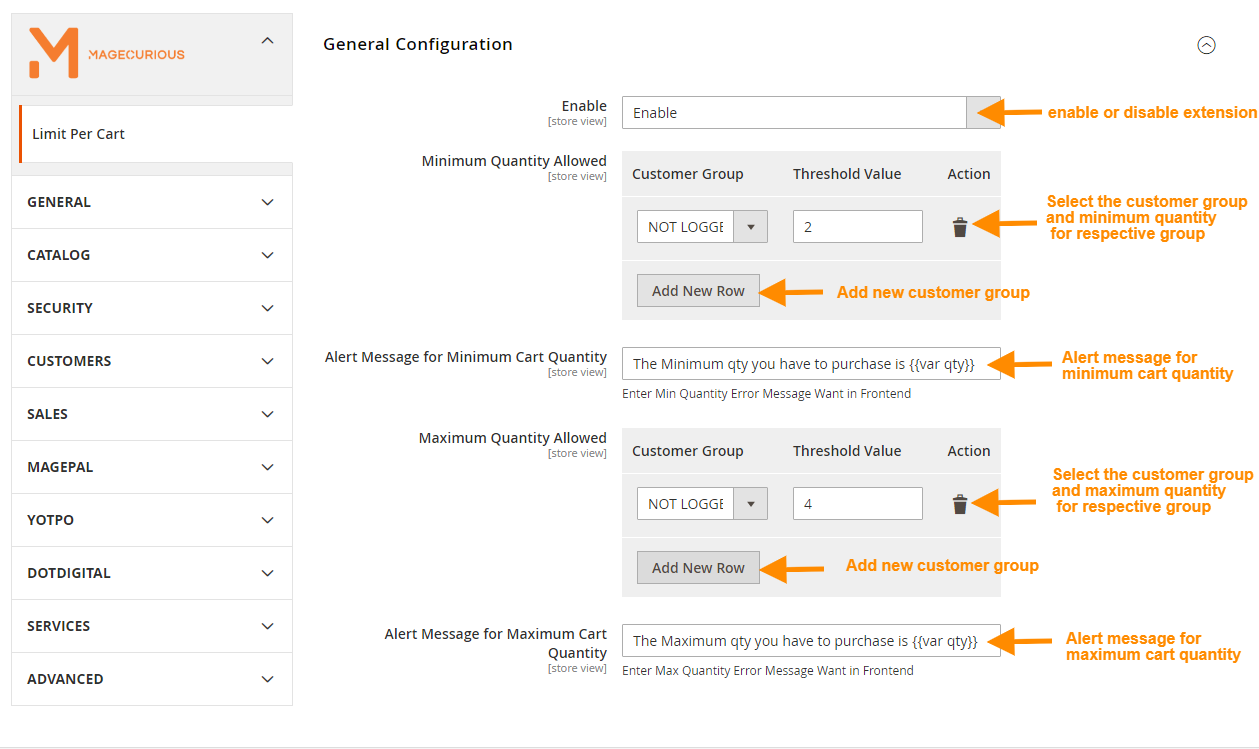
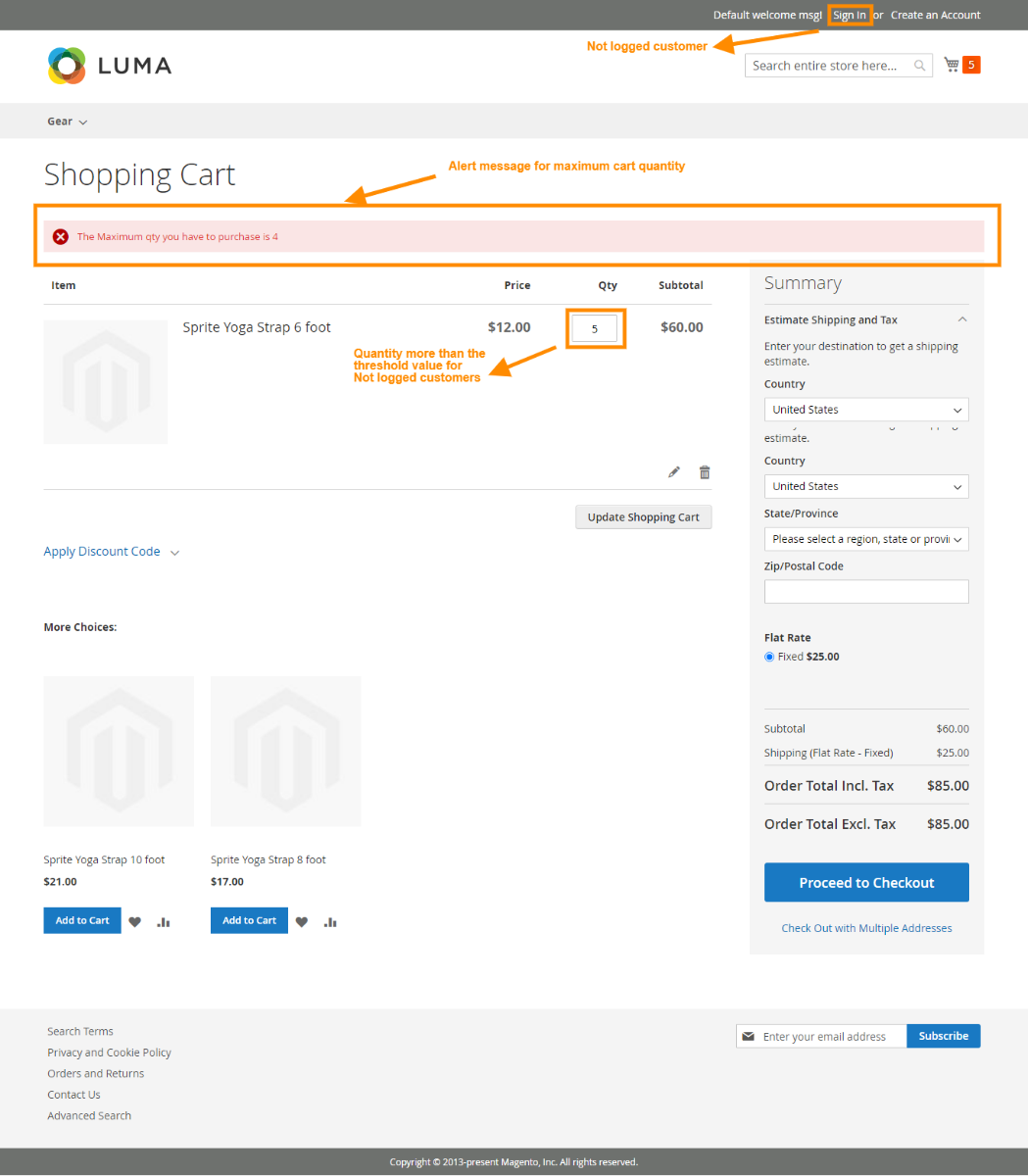
This extension allows the admin to set the minimum and maximum quantity per cart to go for checkout successfully. In case, the customer adds more or lesser quantity, they are shown an error message and they cannot proceed to checkout until they meet the quantity condition.
Features
- The admin can Enable/Disable the module.
- Admin set custom error messages for minimum and maximum quantity.
- Admin allows to set minimum and maximum quantity for customers group base per cart.
- Open source code and easy to customise
- Set restrictions on the cart quantity based on customer groups.
- Compatible With 2.0.x, 2.1.x, 2.2.x, 2.3.x, 2.4.x


Magento2 Limit Quantity Per Cart Extension by MageCurious
Limit Quantity Per Cart extension for Magento 2 by Magecurious allows store admins to manage cart per quantity purchases. They can set a maximum and minimum quantity limit on per cart for any customer group. A custom message warns customers if their purchase quantity in a particular cart minimum or maximum below that limit.
This concept is helpful to avoid the risk of going out of stock of products of best selling categories.
- This extension enables administrators to establish minimum and maximum quantity thresholds per cart for successful checkout.
- If a customer adds a quantity that exceeds or falls below these limits, they receive an error message and cannot proceed to checkout until meeting the specified quantity conditions.
- It helps in stock management and makes a profit with minimum effort. By default, Magento 2 allows to set of minimum order quantity but does not support minimum and maximum quantity limit as well as impose such conditions based on customer groups.
- Magento 2 Limit Cart Quantity extension helps to manage sales in-store by placing restrictions on cart item numbers based on customer groups.
- They can set a maximum and minimum quantity limit on per cart for any customer group. A custom message warns customers if their purchase quantity in a particular cart is minimum or maximum below that limit.
- To learn more about how the extension works, read our user guide.
What Is The Purpose Of The Magento 2 Limit Quantity Per Cart Extension?
- The purpose of the Magento 2 Limit Quantity Per Cart extension is to provide online store owners with the ability to set limits on the number of products that customers can purchase in a single cart transaction.
- This extension allows administrators to define maximum purchase quantities for specific products, categories, or customer groups, thereby helping to manage inventory, prevent bulk ordering, and maintain fair purchasing practices on the e-commerce platform.
- Overall, the Magento 2 Limit Quantity Per Cart extension helps streamline inventory management, prevent overordering, and enhance the shopping experience for customers, ultimately benefiting both store owners and shoppers.
Advantages Of The Magento 2 Limit Quantity Per Cart Extension?
- Inventory Management: It helps in better-managing inventory by limiting the quantity of products customers can purchase in a single transaction. This prevents situations where a single customer buys out a large portion of available stock, ensuring that products are available for other customers as well.
- Prevention of Bulk Ordering: By setting maximum purchase quantities, the extension prevents customers from placing excessively large orders, which could strain inventory resources or create logistical challenges in fulfilment.
- Fairness and Equitability: It promotes fairness and equitability by ensuring that all customers have an equal opportunity to purchase products. Limiting quantities per cart transaction prevents any single customer or group from monopolizing available stock.
- Enhanced User Experience: By preventing customers from encountering out-of-stock messages due to excessive ordering, the extension improves the overall shopping experience and reduces frustration for customers.
- Customization Options: The extension typically offers flexibility in setting quantity limits based on various parameters such as specific products, product categories, or customer groups. This allows administrators to tailor restrictions according to their unique business requirements.
- Boost in Sales: By encouraging customers to purchase reasonable quantities and ensuring that products remain available to a wider customer base, the extension can potentially boost sales by maintaining a steady flow of purchases without the risk of stockouts caused by bulk ordering.
Customer Support
+91 9327798896 OR Contact Us OR support@magecurious.com
Frequently Asked Questions
The Magento 2 Limit Per Cart module is an extension that allows administrators to set minimum and maximum quantity limits per cart for successful checkout on their Magento 2 e-commerce store.
The module works by enabling administrators to define specific quantity thresholds for products in the cart. If customers attempt to proceed to checkout with quantities that exceed or fall below these limits, they are shown an error message and cannot pro
This module helps administrators effectively manage inventory by preventing customers from ordering excessively large or small quantities of products in a single transaction. It promotes fairness among customers and ensures a smoother checkout process.
Yes, the module typically offers customization options, allowing administrators to set different quantity limits based on specific products, categories, or customer groups, according to their business needs.
While it may initially require customers to adhere to specified quantity limits, the module ultimately enhances the shopping experience by preventing issues such as stockouts and ensuring fair access to products for all customers.
This extension limits the number of items a customer can add to their shopping cart, which helps manage inventory.
It prevents customers from ordering excessive quantities, which ensures accurate stock levels and avoids over-selling.
Yes, you can define quantity limits per product in the store's configuration settings.
Do you need specific features for your business needs?
Fill below form we will contact you soon
Changelog
- Minor Bug Fixed
- Compatible with Magento 2.4.7
- Compatible With Hyva Theme