

Magento 2 Product Image Slider For Category Page


Magento 2 Product Image Slider For Category Page
This extension allows merchants to showcase product images in a specific order, enhancing the visual appeal and user experience of the category page. With this feature, merchants can organize and present their products more effectively, ultimately leading to increased engagement and sales.
Features
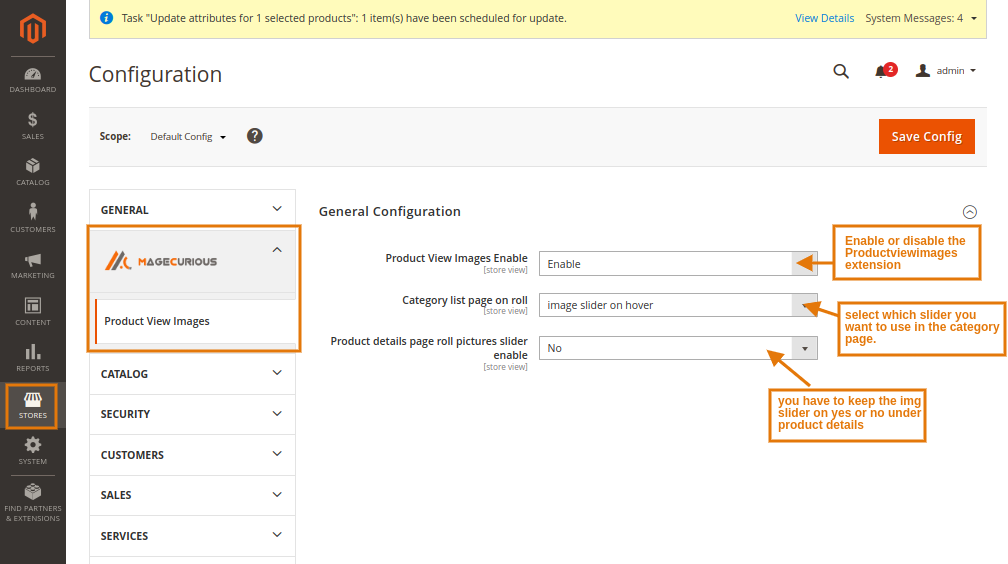
- The admin can Enable/Disable the module.
- Working on desktop & mobile responsive view.
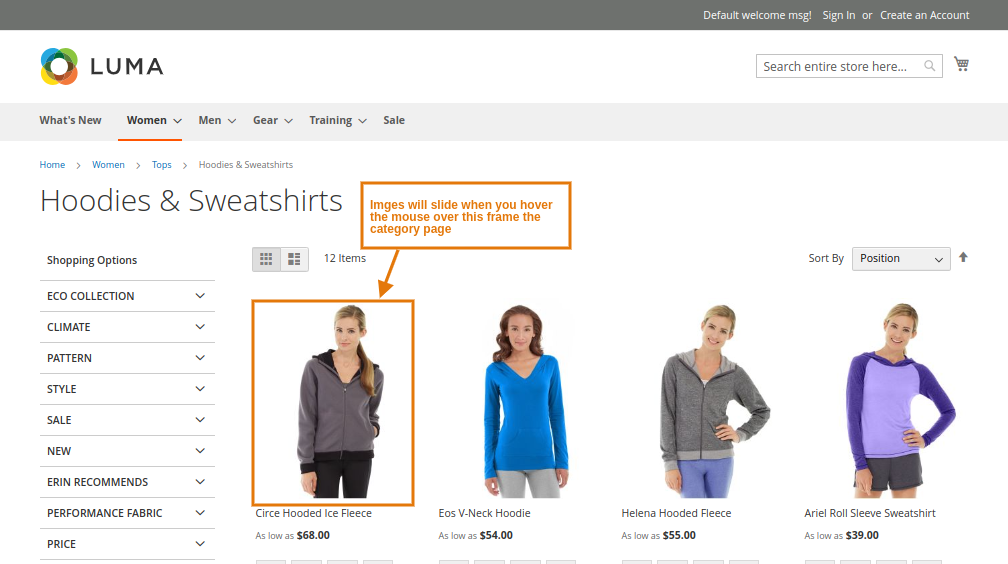
- Automatically slides the image when a product is hovering in desktop view.
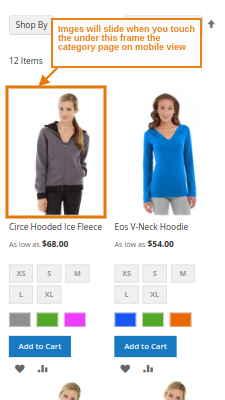
- When you touch an image in mobile view, an image slides automatically.
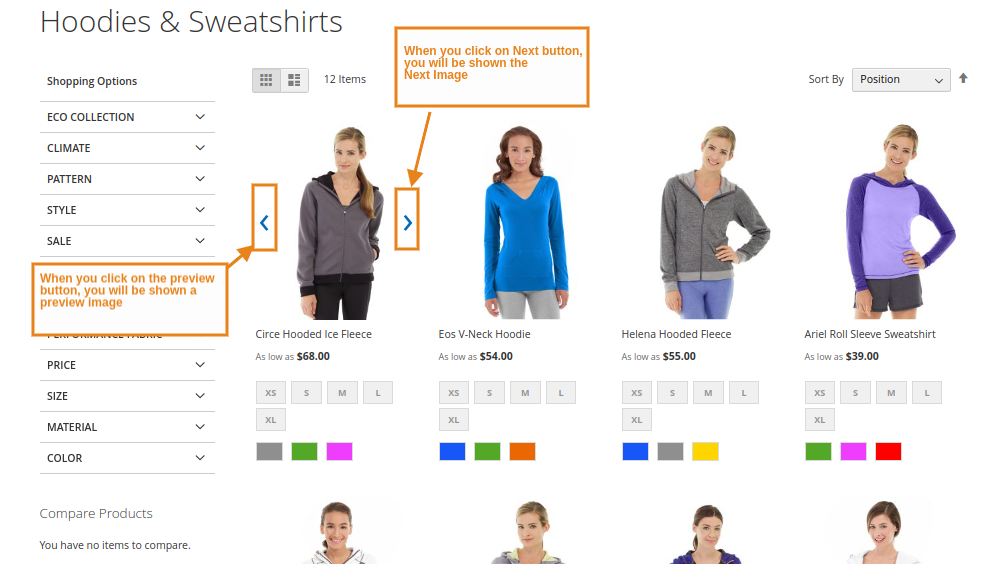
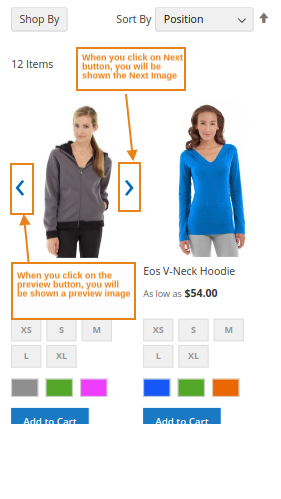
- Clicking the previous and next buttons causes the slider to display the images in desktop view.
- Once the image is touched, the previous and next views are displayed. The image is shown in the desktop view by the slider when the previous and next buttons are clicked.
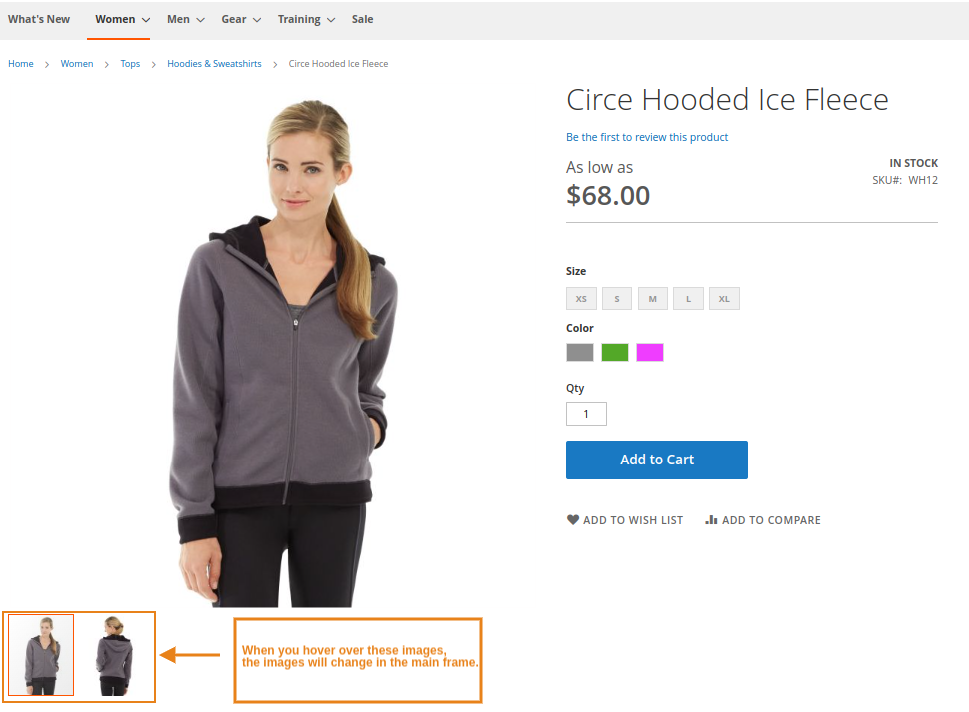
- These photos will automatically change in the mainframe as you hover over them.
- Compatible With 2.0.x, 2.1.x, 2.2.x, 2.3.x, 2.4.x


Magento2 Product Image Slider For Category Page Extension helps store owner to show image slider on category/list pages.
As we all know that in today's era, technology has made a lot of progress, without technology no work can be done. “Whatever is visible is sold” So, Today we are talking about Image slider technology. With e-com businesses, technology acts as an enabler. This allows sellers to not only make their products visible, but also more attractive & more easy for customers.
So let's know what is there in the extension that we have brought for you and how it works.
Why MageCurious Product Image Slider For Category Page?
- There are 2 tricks to see the image slider in the category page.
- Image slider on product hover:- In this mode you can change the image when you mouse over the image.
- Image slider on arrow click:- In this mode you can see one by one by clicking on that image with the mouse.
- Easily available option to enable or disable from the admin side.
- Working on desktop & mobile responsive view.
- Automatically slides the image when a product is hover in desktop view .
- When you touch an image in mobile view, an image slides automatically.
- Clicking the previous and next buttons causes the slider to display the images in desktop view.
- Once the image is touched , the previous and next views are displayed. The image is shown in desktop view by the slider when the previous and next buttons are clicked.
- These photos will automatically change in the main frame as you hover over them.
- The Magento 2 Product Image Slider for Category Page is a feature that enables the creation of an image slider specifically designed for category pages in Magento 2.
- This extension allows merchants to showcase product images in a specific order, enhancing the visual appeal and user experience of the category page.
- With this feature, merchants can organize and present their products more effectively, ultimately leading to increased engagement and sales.
- Overall, the Magento 2 Product Image Slider for Category Page Extension helps optimize category pages, leading to increased customer engagement, improved sales, and a more competitive online store.
- To learn more about how the extension works, read our user guide.
What Is The Purpose Of The Magento 2 Product Image Slider For Category Page Extension?
- The purpose of the Magento 2 Product Image Slider for Category Page Extension is to enhance the visual presentation of products on category pages within a Magento 2 e-commerce store.
- This extension allows store owners to display multiple product images in a slider format directly on the category page.
- By showcasing various product images in a dynamic slider, it provides customers with a more engaging and informative shopping experience.
- This can help to increase user engagement, improve product visibility, and ultimately drive more sales by providing customers with a clearer view of the products available within a specific category.
How To Use Magento 2 Product Image Slider For Category Page Extension By MageCurious ?
Advantages Of The Magento 2 Product Image Slider For Category Page Extension?
- Enhanced Visual Presentation: It allows for the display of multiple product images in a slider format, making the category pages visually appealing and engaging for customers.
- Improved User Experience: By showcasing product images in a slider, customers can easily view different angles or variations of the products without navigating away from the category page, enhancing the overall shopping experience.
- Increased Product Visibility: With a dynamic image slider, products are more prominently displayed, increasing their visibility to customers browsing through the category pages.
- Greater Product Information: Customers can gain a better understanding of the products available within a category by viewing multiple images, which may include different colours, sizes, or features.
- Higher Conversion Rates: The visually appealing presentation and improved user experience can lead to higher conversion rates as customers are more likely to be enticed by the products and make a purchase.
- Customization Options: The extension typically offers customization options, allowing store owners to adjust the appearance and behaviour of the image slider to suit their brand and preferences.
- Competitive Advantage: By leveraging this extension, Magento 2 store owners can stay ahead of competitors by offering a more visually engaging and user-friendly shopping experience.
Customer Support
+91 9327798896 OR Contact Us OR support@magecurious.com
Frequently Asked Questions
By incorporating an image slider into your category pages, this extension enables you to display multiple product images within a compact space, providing visitors with a more comprehensive view of your products at a glance. This can lead to increased user engagement, improve product visibility, and ultimately drive more sales by providing customers with a clearer view of the products available within a specific category.
Yes, the extension typically offers customization options such as the ability to adjust slider speed, transition effects, image dimensions, and other styling preferences to align with your store's branding and design aesthetic.
Yes, one of the key features of this extension is the ability to customize the order in which products appear within the image slider. You can arrange products manually or set specific criteria for product ordering, such as best-selling items, newly added
It's important to verify the compatibility of the extension with your specific version of Magento 2 before installation. Most extensions will indicate which versions they support, so be sure to review this information before making a purchase or installat
While adding visual elements such as image sliders can enhance the user experience, it's essential to consider the performance impact on your store. Look for extensions that are optimized for performance to ensure that they don't slow down your site's loa
This extension lets you showcase multiple product images in a sliding format on category pages.
Magento 2 Product Image Slider for Category Page increases visual appeal, giving customers a dynamic and engaging shopping experience.
Yes, you can adjust the design, size, and transition effects to fit your store's style.
Do you need specific features for your business needs?
Fill below form we will contact you soon
Changelog
- Minor Bug fixing
- Magento Letest Version Compatible.
- Minor Bug fixing
- Minor Bug fixing
- Compatible with configurable product.
- Compatible with Hyva Theme