

Hello Everyone,
In this blog we will learn how to create a cart price rule in Magento 2?
Without wasting your time, let us guide you straight away. Follow the easy step given below to edit your details in magento 2.
STEPS FOR CREATE A CART PRICE RULE IN MAGENTO 2
STEP 1: First go to the Marketing > Promotions > Cart Price Rule.

STEP 2: After the above step simply tap on Add New Rule and fill in the mandatory required information to create a cart price rule for your Magento store.
- Rule Name & Description:- Here, the admin needs to enter a rule name and some desired description.
- Status:- Rules are automatically applied when the status is active.
- Coupon:- This option enables applying rules by choosing Specific Coupon Option will allow you to enter your desired code in that box.
- Uses per Coupon:- Admin has to add the number how many times the single code can be applied.
- Uses per Customer:- This is for logged in customers only and one time per customer.
- From & To:- The time period set up for applying the coupon code.

STEP 3:- Admin has 2 options out of all to set the conditions and one can select as per their choice and then select either TRUE or FALSE.
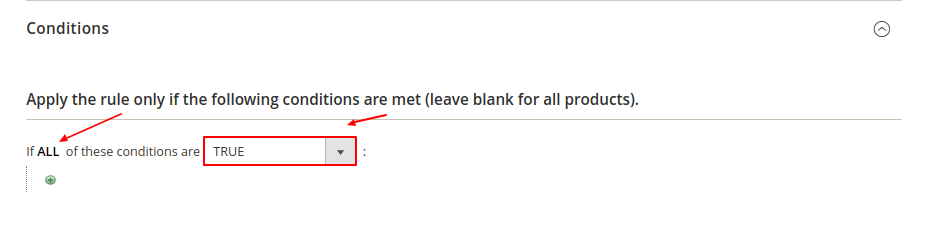
STEP 4:- Choose your condition that fulfils your requirements.

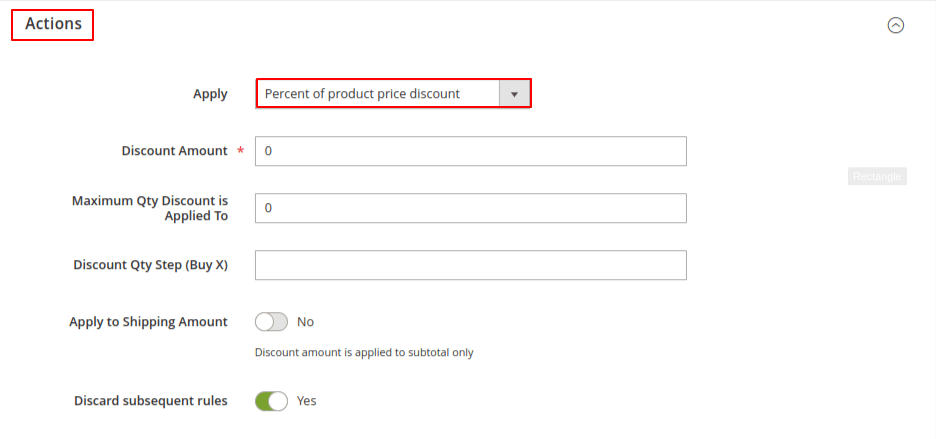
STEP 5:- Select the action you want from the Apply option and add the required details.
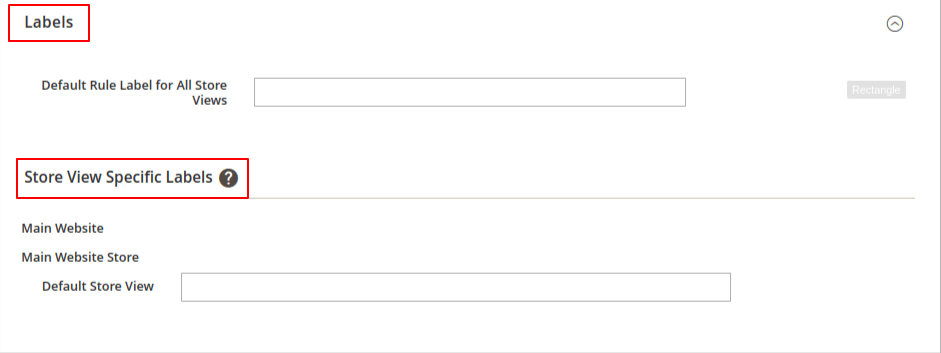
STEP 6:- Accordingly enter text in default rule label for all store views and then setup store view specific label.
STEP 7:- Click on save configuration.

Final Thoughts:
So this was the easiest way which we have told you in this blog. This is how you can create a cart price rule in Magento 2. Hope you liked the blog.
So quickly go to the comment box and tell me how you like this blog?
Stay tuned with us on our site to get new updates of Magento.
Thanks for reading and visiting our site.
