

Hello Everyone,
In this blog we will learn how to configure SMTP in Magento 2?
Without wasting your time, let us guide you straight away. Follow the easy step given below to edit your details in magento 2.
STEPS FOR CONFIGURE SMTP IN MAGENTO 2.
Step 1: First create an email account for your website domain.
Step 2: Now to set up SMTP email for Magento 2 store it is mandatory to have a verified email address for the store domain. First of all, create an email address for your Magento 2 store and after that, you have to follow the steps given below. You can create emails in any email hosting provider you want.
Step 3: Configure sending emails in your Magento 2 store.
Step 4: Now, after completing the above step click on Stores and tap on Configuration below Settings. As shown in the screenshot below.

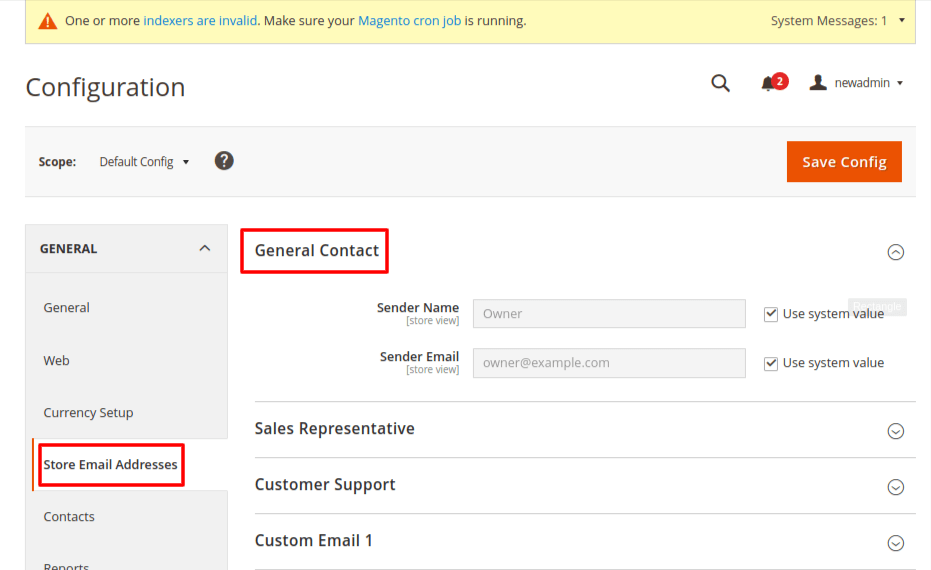
Step 5: Now go to the General option and tap on Store email address and locate the General Contacts section as shown in the screenshot below.
Step 6: Now, add the sender name as per your wish which will be displayed as sender in all your sent emails.
Step 7: After this add the email ID which you created in the above step to the Sender Email.
Step 8: Set up senders and templates for sales emails from the backend.
Step 9: Here, first of all you have to click on the Sales option and tap on the Sales Emails part and explore the section as shown in the screenshot below.

Step 10: Finally, after completing the above step you can make appropriate changes in the above option as per your requirement. Also, select the email template to send emails to the users of your Magento 2 store.
Step 11: After completion of the above steps, you will be able to easily configure SMTP for your Magento 2 store.
Final Thoughts:
So, This was the easiest way which we have told you in this blog. This is how you can configure SMTP in Magento 2. Hope you liked the blog.
So quickly go to the comment box and tell me how you like this blog?
Stay tuned with us on our site to get new updates of Magento.
Thanks for reading and visiting our site.
